
🗼 Build a Tower in Minecraft with VisualModder
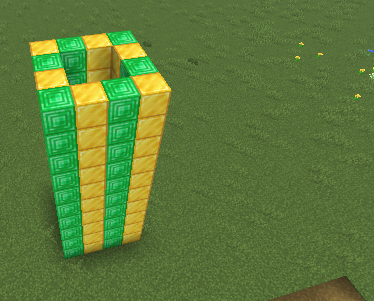
In this tutorial, you will learn how to make a tall tower automatically using code in Minecraft.
Instead of placing blocks one by one, the computer will build it for you!
🎯 What This Program Builds
- A tall tower made of gold and emerald blocks
- 10 floors high
- A square shape on each level
🧠 The Code
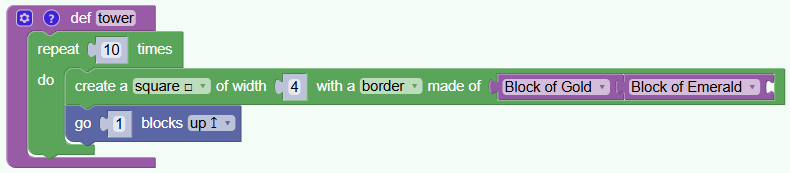
🧩 Step 1 — Create a Function

Explanation:
- def means you are creating a function.
- A function is a group of instructions that run together.
- This function is called tower because it builds a tower.
🔁 Step 2 — Repeat the Building 10 Times
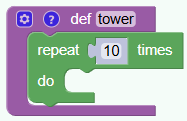
What does this mean?
- The “repeat” block repeats what’s inside it
- We say to repeat it 10 times
- Each repeat builds one level of the tower.
So the tower will have 10 floors! 🏢
🟨 Step 3 — Build One Floor

This line builds a square of blocks.
- createSquare(4) makes a square that is 4 blocks wide.
- The blocks used are:
- 🟡 Gold Block
- 🟢 Emerald Block
- The game alternates between these blocks to make a cool pattern.
Each loop adds another square on top.
⬆️ Step 4 — Move Up for the Next Floor

Why is this important?
- After building one level, the builder moves up.
- This makes the next square appear above the last one.
- Without this, all squares would overlap!
So the tower grows taller and taller. 🗼
🎮 What Happens When You Run the Function?
- The first square appears on the ground
- The builder moves up
- Another square appears
- This repeats 10 times
Result: A shiny tower made of gold and emerald!
🌟 Fun Challenges
- Change the height (try 20 floors!)
- Use different blocks like diamond or stone
- Make a giant castle tower
🎉 Amazing! You just learned how to build automatically with code!
Here is the python code that made this possible
def tower():
  for count in range(10):
    vm.createSquare(4, False, [Block.GOLD_BLOCK, Block.EMERALD_BLOCK]);
    vm.moveTo(1, Direction.UP)