
🟨 Create a 3-Color Carpet in Minecraft with VisualModder
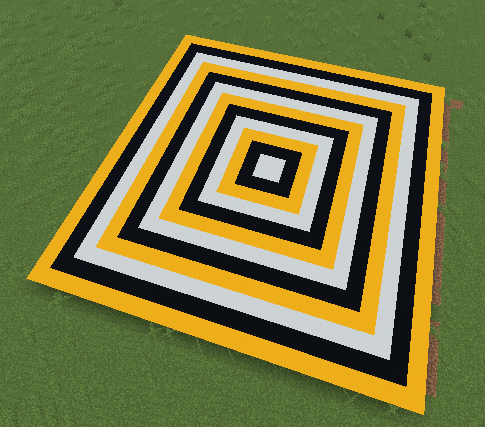
Download the XML code here:
In this tutorial, you will learn how to create a giant colorful carpet automatically using code. The carpet will have three colors and a cool pattern!
🎯 What This Program Builds
- A large square carpet on the ground
- Three colors: white, black, and yellow
- A repeating pattern of shrinking squares
🧠 The Code
🧩 Step 1 — Create a Variable
What is a variable?
- A variable is like a box that stores numbers.
- This one is called counter.
- It will control how big each square is.
🧠 Step 2 — Create the Function

- This creates a function named carpet3colors.
- When you run it, the carpet will be built automatically.
🔁 Step 3 — Draw White Squares

What is happening?
- The program draws squares that get smaller each time.
- from 20 to 2 by 6 means:
- Start at size 20
- Decrease by 6 each time
- Stop at size 2
So the game draws big → medium → small white squares.
⬛ Step 4 — Add Black Squares

- This draws black squares on top of the white ones.
- Because the sizes are slightly different, it creates a pattern.
🟡 Step 5 — Add Yellow Squares

- Now yellow squares are added.
- These are the biggest squares.
- All three colors together create a layered carpet.
🎨 Why the Pattern Looks Cool
- Each color starts at a different size.
- The squares shrink as they are drawn.
- This makes a repeating border pattern.
It looks like a fancy floor or a magic rug! ✨
🎮 What Happens When You Run It
- Large yellow squares appear
- Black squares appear inside
- White squares appear inside those
- The pattern repeats smaller and smaller
Result: A beautiful 3-color carpet!
🌟 Fun Challenges
- Change the colors to your favorites
- Try making a rainbow carpet 🌈
- Use it as the floor of a palace or temple
🎉 Great job! You used coding to create art!
Here is the Python code that creates it:
# Variables
counter = None

def carpet3colors():
  global counter
  for counter in range(20, 1, -6):
    vm.createRectangle(counter, counter, False, Block.WHITE_CONCRETE);
  for counter in range(22, 1, -6):
    vm.createRectangle(counter, counter, False, Block.BLACK_CONCRETE);
  for counter in range(24, 1, -6):
    vm.createRectangle(counter, counter, False, Block.YELLOW_CONCRETE);