
🏃 How to Create a Parkour Game in Minecraft Using VisualModder
This guide will teach you step-by-step how to build a parkour challenge in Minecraft using VisualModder code. Parkour means jumping across blocks without falling!
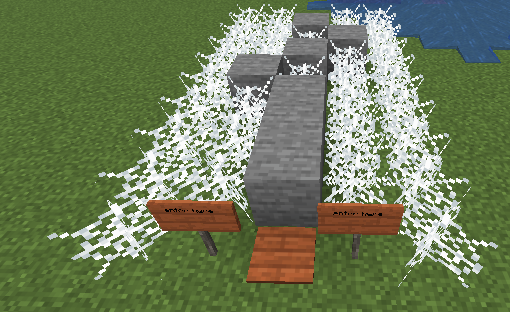
🎯 What Your Program Will Do
- Build a mini obstacle course automatically
- Show where to start
- Start a timer when the player steps on a plate
- Stop the timer at the finish
- Prevent cheating by flying
🧱 Step 1 — Build the Parkour Course
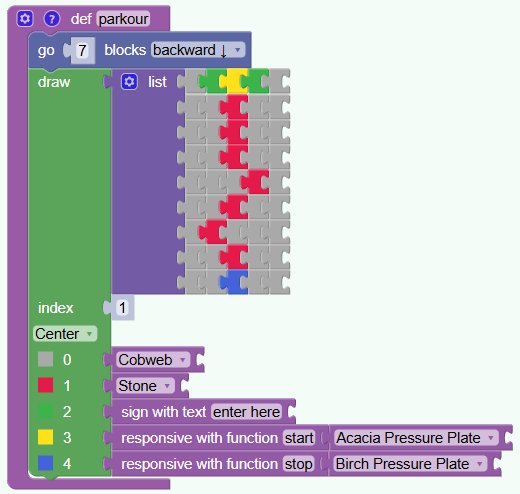
- def parkour(): creates a function called parkour.
- A function is a set of instructions that can be run anytime.
- vm.moveTo moves the building location so the course appears in front of the player.
- responsive with function defines a function to be called when the players teps on the pressure plate
What does this grid mean?
This is like a map made of numbers. Each number tells Minecraft which block to place.
- 0 = empty space
- 1, 2, 3, 4 = special blocks (defined below)
The rows show where blocks will appear. Players will jump across them.
🧩 Step 3 — Choose Which Blocks to Use
What each block does:
- 🕸️ Cobweb — slows the player down
- 🪨 Stone — normal jumping block
- 🪧 Sign — tells players where to enter
- 🟫 Start plate — begins the timer
- ⬜ Finish plate — stops the timer
So when the map uses number 3, it places the start plate.
🚫 Step 4 — Anti-Cheat System
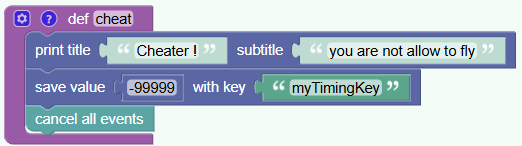
Why is this needed?
- Some players might try to fly to finish faster.
- This function stops the game if flying is detected.
- It shows a message saying cheating is not allowed.
- It sets the timer value so that the score will be bad
- it disables the check if the player is flying
▶️ Step 5 — Start the Game
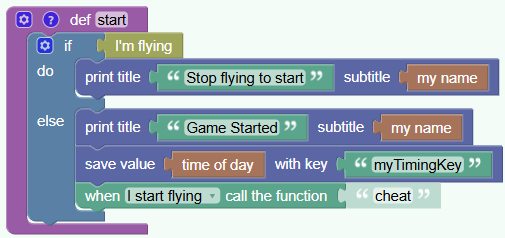
What happens here?
- The game checks if the player is flying.
- If yes → it asks them to stop.
- If no → the timer starts.
- Save value .. with key makes sure that the time is stored in a variable that can be read later
- The game watches for flying to catch cheaters.
🏁 Step 6 — Stop the Timer
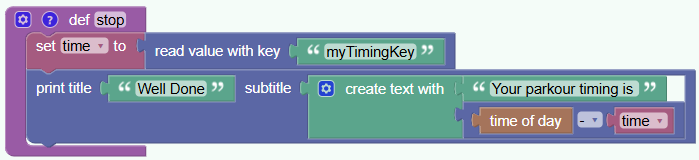
What happens at the finish line?
- The game reads the start time.
- It checks the current time.
- It subtracts to find how long you took.
- Your score appears on screen.
🎮 How Players Use Your Parkour
- Walk to the sign
- Step on the start plate
- Jump across the obstacles
- Reach the finish plate
- See your time and try again!
🎉 Congratulations! You built your own parkour game!
Here is the python code of the program
# Python code of the Parkour minigame using Visualmodder
# Variables
time = None

def parkour():
  global time
  vm.moveTo(7, Direction.BACKWARD)
  vm.createDrawing(
  ["02320",
   "00100",
   "00100",
   "00100",
   "00010",
   "00100",
   "01000",
   "00100",
   "00400"
  ], [
    [dict(TYPE=Block.COBWEB)],
    [dict(TYPE=Block.STONE)],
    [dict(SIGN="enter here", TYPE=Block.ACACIA_SIGN)],
    [dict(ACTION="start", TYPE=Block.ACACIA_PRESSURE_PLATE)],
    [dict(ACTION="stop", TYPE=Block.BIRCH_PRESSURE_PLATE)],
    [Block.NOTHING],
    [Block.NOTHING],
    [Block.NOTHING],
    [Block.NOTHING],
    [Block.NOTHING]
  ], 1, Draw.CENTER);

def cheat():
  global time
  vm.printTitle('Cheater !', 'you are not allow to fly')
  vm.save(-99999, 'myTimingKey')
  vm.clearEvents();

def stop():
  global time
  time = vm.read('myTimingKey')
  vm.printTitle('Well Done', 'Your parkour timing is ' + str(vm.getTimeOfDay() - time))

def start():
  global time
  if vm.isPlayerFlying():
    vm.printTitle('Stop flying to start', vm.getPlayerName())
  else:
    vm.printTitle('Game Started', vm.getPlayerName())
    vm.save(vm.getTimeOfDay(), 'myTimingKey')
    vm.onEvent(Event.STARTED_FLYING, 'cheat');