
Visualmodder v2.0 Python Examples
The following examples demonstrate how to use Visualmodder v2.0 to create structures in Minecraft.
Example : Creating an Empty Square

vm.createSquare(4, False, Block.GOLD_BLOCK)
This example uses createSquare(width, filled, blocks…)
to create a hollow square centered at the cursor. The filled parameter is set to False, so only the outline of the square is created using gold blocks.
Example: Creating an Empty Tower
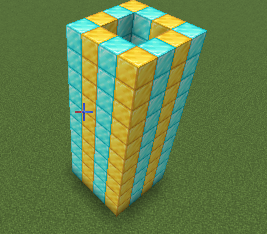
for count in range(10):
  vm.createSquare(4, False, [Block.GOLD_BLOCK, Block.DIAMOND_BLOCK])
  vm.moveTo(1, Direction.UP)
This example uses createSquare(width, filled, blocks…)
This example builds a tower by stacking hollow squares and moving the
cursor upward after each layer. Each iteration adds one level to the tower, resulting in a total height
of 10 blocks.
Example: Creating an Aquarium with dolphins

for count in range(10):
  vm.createRectangle(6, 10, True, Block.GLASS);
  vm.createRectangle(4, 8, True, Block.WATER);
  vm.moveTo(1, Direction.UP)
vm.createLine(3, Entity.DOLPHIN);
This code creates a vertical aquarium with dolphins. For 10 layers, it first uses createRectangle(width, height, filled, blocks...) to build a 6×10 glass rectangle as the outer walls, then another createRectangle call to fill a 4×8 inner rectangle with water. After each layer, moveTo(1, Direction.UP) moves the cursor up by one block. Finally, createLine(length, entities...) is used to place 3 dolphins inside the aquarium.
Example: Get your armor
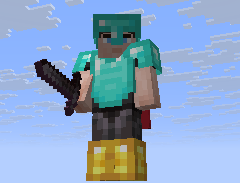
vm.giveToPlayer(Equip.GARMENT, [Item.GOLDEN_CHESTPLATE, Item.DIAMOND_HELMET, Item.GOLDEN_BOOTS, Item.NETHERITE_LEGGINGS])
vm.giveToPlayer(Equip.RIGHT_HAND, Item.NETHERITE_SWORD)
vm.giveToPlayer(Equip.INVENTORY, [Item.BOW, Item.GOLDEN_APPLE])
for count in range(64):
  vm.giveToPlayer(Equip.INVENTORY, Item.ARROW)
This code gives the player a complete set of specific items in different slots. The armor pieces, including a golden chestplate, diamond helmet, golden boots, and netherite leggings, are equipped automatically.
A netherite sword is placed in the player’s right hand, while a bow and a golden apple are added to the inventory.
Finally, the code adds 64 arrows to the inventory using a loop.
Example: Iron Cone
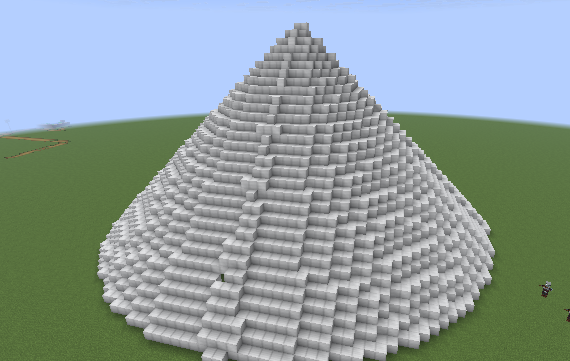
for i in range(30, 0, -1):
  vm.createCircle(i, False, Block.IRON_BLOCK);
  vm.moveTo(1, Direction.UP)
This code creates a vertical, hollow cone or tower made of iron blocks. It uses a loop that starts with a circle of radius 30 and decreases the radius down to 1. In each iteration, createCircle(radius, filled, blocks...) is used to create a hollow circle of iron blocks, and moveTo(1, Direction.UP) moves the cursor up by one block for the next layer, resulting in a tapering, stacked structure.
Example: Random Dungeon Sign
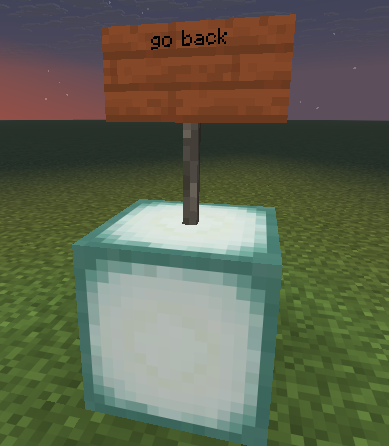
num = random.randint(1, 3)
vm.createBlock(Block.SEA_LANTERN)
vm.moveTo(1, Direction.UP)
if num == 1:
  text = 'go right'
elif num == 2:
  text = 'go left'
else:
  text = 'go back'
vm.createBlock(dict(SIGN=text, TYPE=Block.ACACIA_SIGN))
This code randomly chooses one of three directions and displays it on a sign. First, random.randint(1, 3) generates a number between 1 and 3.
A sea lantern is placed at the cursor using createBlock(Block.SEA_LANTERN), and moveTo(1, Direction.UP) moves the cursor up by one block. Depending on the random number, a text string is assigned to indicate “go right,” “go left,” or “go back.”
Finally, createBlock(dict(SIGN=text, TYPE=Block.ACACIA_SIGN)) places an acacia sign with the chosen text at the current cursor position.
Example: Firework Stars when the player moves
vm.onEvent(Event.MOVED, 'fireworks');

def fireworks():
  global num, text, colors
  for count5 in range(3):
    vm.createSquare(4, False, Particle.FIREWORK);
    vm.moveTo(1, Direction.UP)
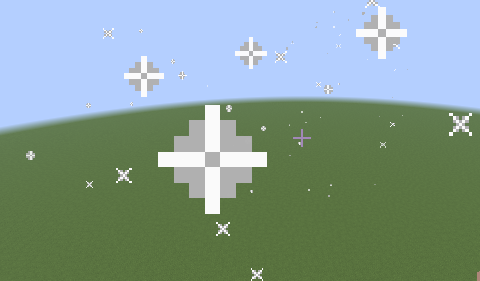
This code sets up an automatic reaction to the player moving. The call to onEvent(Event.MOVED, 'fireworks') registers the fireworks function to execute whenever the player moves. The fireworks function itself creates three layers of hollow squares made of firework particles using createSquare(4, False, Particle.FIREWORK) and moves the cursor up one block after each layer with moveTo(1, Direction.UP).
If you later call clearEvents(), this automatic execution will stop, preventing the fireworks function from triggering on player movement.
Example: Cover a village with snow
vm.createSquare(50, True, dict(GROUND=True, TYPE=Block.SNOW))
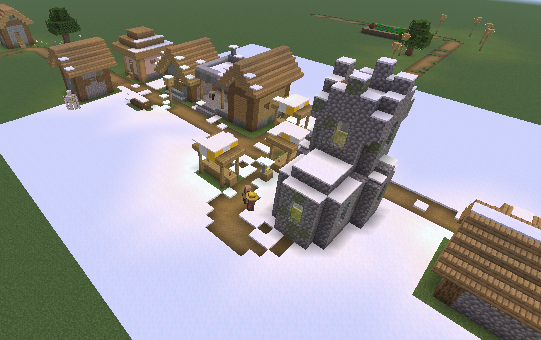
This code creates a large, filled square of snow and applies a special placement rule using a dictionary attribute. The createSquare(50, True, dict(GROUND=True, TYPE=Block.SNOW)) call builds a filled square with a width of 50 blocks, using snow as the block type.
By setting the GROUND attribute to True, each snow block is placed on the first non-air block found when searching downward from the cursor position, ensuring the snow correctly settles on the terrain instead of floating in the air.
Example: Create random colored carpets using lists
for i in range(2, 30, 2):
  colors = [Block.RED_WOOL,
            Block.BLACK_WOOL,
            Block.GREEN_WOOL,
            Block.YELLOW_WOOL,
            Block.PINK_WOOL]
  vm.createSquare(i, False, colors[random.randint(0, len(colors) - 1)]);
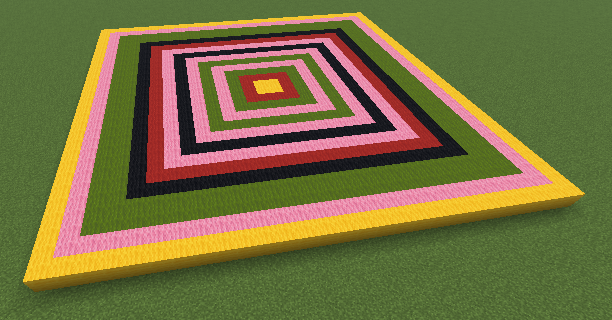
This program generates a series of square carpet outlines with increasing size.
The loop iterates from size 2 up to 28, increasing by 2 each time, so every square has an even side length. For each iteration, a list of wool block colors is defined, including red, black, green, yellow, and pink. One color is randomly selected from this list, and a square outline of the corresponding size is created using that color.
The result is a layered pattern of square carpets, each with a different randomly chosen color, creating a vibrant and varied decorative effect.
Example: Create a disco light covered ground

len2 = 20
inner_len = len2 - 2

vm.moveTo(2, Direction.DOWN)

# Base frame of the disco floor
vm.createRectangle(len2, len2, False, Block.BLACK_CONCRETE)

# Interactive pressure-plate floor
vm.createRectangle(inner_len, inner_len, True, Block.SPRUCE_PRESSURE_PLATE)

# Move up to place entities and lighting
vm.moveTo(1, Direction.UP)

# Parrots placed underneath to randomly activate pressure plates
vm.createRectangle(5, 5, False, Entity.PARROT)

# Redstone lamps that light up when plates are activated
vm.createRectangle(inner_len, inner_len, True, Block.REDSTONE_LAMP)

# Build enclosing layers above the disco floor
for count in range(3):
    vm.createRectangle(len2, len2, False, Block.BLACK_CONCRETE)
    vm.moveTo(1, Direction.UP)
This program creates a disco floor effect using pressure plates, parrots, and redstone lamps.
It starts by defining the size of the floor and moving the cursor two blocks downward to position the structure correctly. A black concrete frame is then created to outline the base of the disco floor. Inside this frame, a filled square of spruce pressure plates is placed, forming the interactive surface of the floor. The cursor is moved up one block, and a small square of parrots is spawned underneath; when parrots stand on pressure plates, they trigger them, creating the illusion of randomly lighting tiles. Above the parrots, a filled square of redstone lamps is created, which will light up when the pressure plates are activated. Finally, the program builds three additional layers of black concrete above the structure, enclosing the mechanism and giving the disco floor a clean, finished look.
Example: Draw a hearth using polar coordinates
import math

scale = 0.5     # overall heart size
steps = 360      # smoothness of the curve

for i in range(steps):
  t = math.radians(i)

  # Classic heart parametric equations
  x = 16 * math.sin(t)**3
  y = (13 * math.cos(t)
       - 5 * math.cos(2 * t)
       - 2 * math.cos(3 * t)
       - math.cos(4 * t))

  # Convert to polar coordinates
  r = math.sqrt(x*x + y*y) * scale
  theta = math.degrees(math.atan2(y, x))

  vm.moveTo(Coordinate.CYLINDRICAL, r, theta, 0)
  vm.createBlock(Block.RED_WOOL)
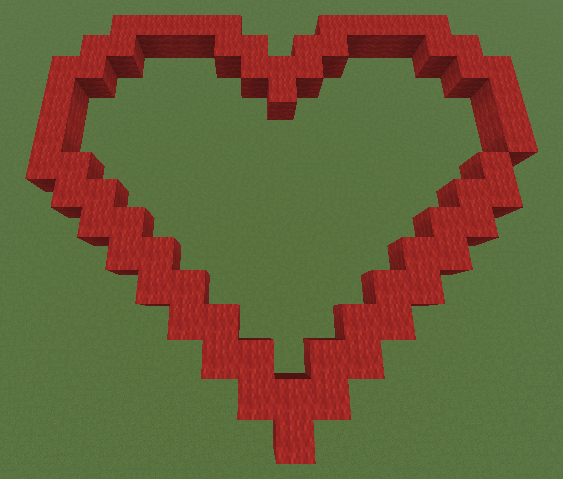
This program draws a proper heart shape using cylindrical (polar) coordinates.
The heart is generated from a mathematical heart curve and converted into radius + angle so it can be drawn with moveTo(Coordinate.CYLINDRICAL).
Example: Create a simple maze
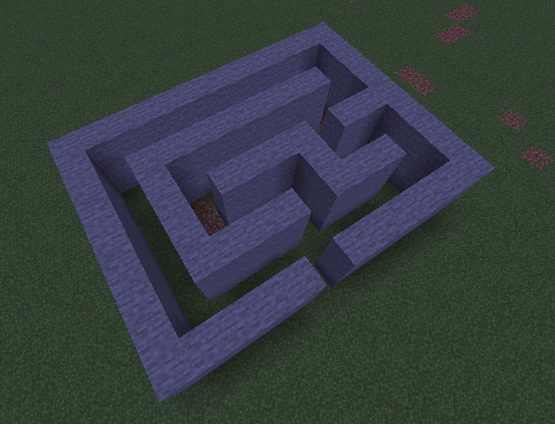
# This program creates a simple 3D maze by stacking the same 2D maze pattern across multiple vertical layers.

maze = [
  "XXXXX XXXXXX",
  "X          X",
  "X XXXX XXX X",
  "X X    X   X",
  "X X XXXX XXX",
  "X X        X",
  "X XXXXXXXX X",
  "X          X",
  "XXXXXXXXXXXX"
]

wall_block = Block.STONE
path_block = Block.AIR
maze_height = 3

for level in range(maze_height):
  # Reset the cursor to the starting position and move up
  # to build the current vertical layer of the maze
  vm.moveTo(Position.START)
  vm.moveTo(level, Direction.UP)

  # Build the maze row by row
  for row in maze:
    for cell in row:
      if cell == "X":
        vm.createBlock(wall_block)
      else:
        vm.createBlock(path_block)

      # Move to the next column
      vm.moveTo(1, Direction.RIGHT)

    # Return to the beginning of the row and move forward
    # to start drawing the next row
    vm.moveTo(len(row), Direction.LEFT)
    vm.moveTo(1, Direction.FORWARD)
This example shows how to build a simple 3D maze by stacking the same 2D layout across multiple layers. The maze is defined using a readable text grid, where walls and corridors are represented by characters, and then generated block by block in the world to create solid, walkable maze walls.
Example : A spiked ball
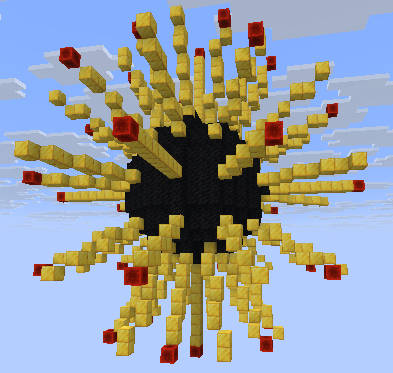
ballRadius = 7
spikeLength = 31
for count2 in range(6):
  # Rotate a row of blocks to create the spikes
  for count in range(6):
    vm.changeInclination(30)
    vm.createLine(spikeLength + 2, [Block.REDSTONE_BLOCK, dict(AMOUNT=spikeLength, TYPE=Block.GOLD_BLOCK), Block.REDSTONE_BLOCK]);
  vm.changeDirection(30)
# Create a sphere
for count3 in range(60):
  vm.createCircle(ballRadius, False, Block.COAL_BLOCK);
  vm.changeInclination(3)
This VisualModder script generates a spiked ball by first constructing evenly spaced spikes and then forming a spherical core. The variables ballRadius and spikeLength define the size of the ball and the length of each spike.
The first nested loop creates the spikes: the inner loop repeatedly tilts the building angle by 30 degrees and draws a line composed mainly of gold blocks, capped with redstone blocks, to form a single row of spikes.
After completing one row, the script rotates the building direction by 30 degrees to distribute the spikes around the ball in multiple directions. Once the spikes are placed, the final loop builds the spherical body by drawing 60 circular layers of coal blocks, each time slightly changing the inclination by 3 degrees, which stacks the circles at different angles to approximate a smooth sphere at the center of the spiked structure.