
Until now, most of our programs have followed a simple rule: the instructions run from top to bottom in the exact order they are written.
But many programs need to make decisions.
For example, a program might need to decide:
- If a block should be one color or another
- If a structure should grow larger or smaller
- If a special action should happen
In programming, these decisions are made using logic and conditional statements.
Conditionals allow a program to ask questions and perform different actions depending on the answer.
This makes programs much more powerful because they can react to different situations.
Concepts You Will Learn
- What logical conditions are
- How programs make decisions
- How to use
ifstatements - How to use
elsestatements - How conditions control program behavior
Why Logic Is Important
Logic is what allows programs to behave intelligently.
Instead of always doing the same thing, the program can choose between different actions.
For example, a Minecraft building program might:
- Place a white block if a number is even
- Place a black block if a number is odd
This simple rule can create patterns such as a chessboard.
Programs can also use conditions to control loops, change shapes, or trigger special actions.
Conditional Statements
In Python, the most common conditional statement is the if statement.
An if statement checks whether a condition is true.
If the condition is true, the instructions below the if statement will run.
For example:
if number > 10:
  print("The number is large")
If the condition is false, Python will skip those instructions.
We can also add an else statement to define what happens when the condition is false.
if number > 10:
  print("The number is large")
else:
  print("The number is small")
This allows programs to make decisions and perform different actions depending on the situation.
Indentation in Conditionals
Just like functions and loops, conditional statements use indentation.
All the instructions that belong to the condition must be indented.
For example:
if condition:
  instruction_one
  instruction_two
The indentation tells Python which instructions belong to the conditional block.
Without proper indentation, the program will not run correctly.
Logic in Minecraft Programs
In Minecraft programming, conditionals allow the robot builder to create more interesting structures.
For example, a program might:
- Alternate between two block colors
- Create different shapes depending on a number
- Change the behavior of loops
These techniques allow programs to create complex patterns and structures automatically.
In the next project we will use logic and conditionals to create structures that change depending on the values used in the program.
Artistic Towers Project
What We Will Build
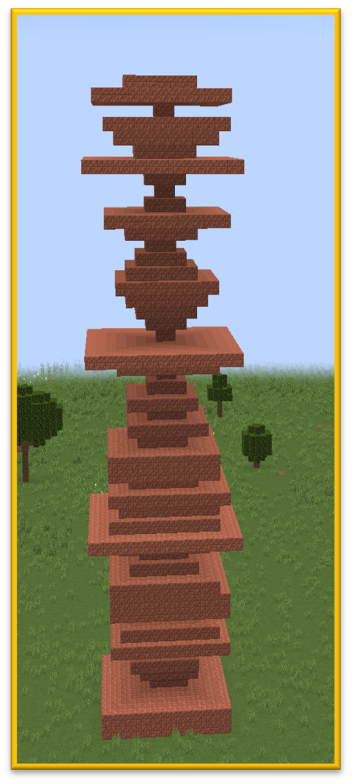
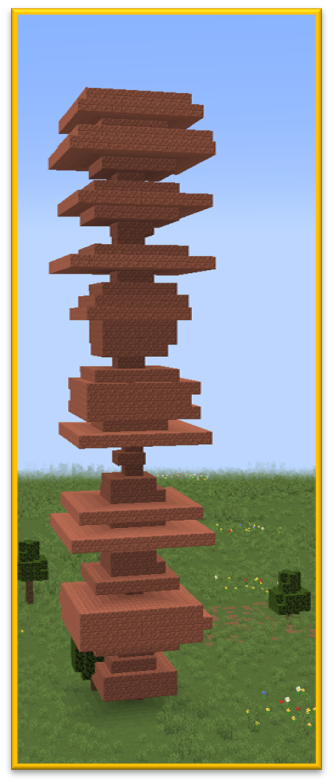
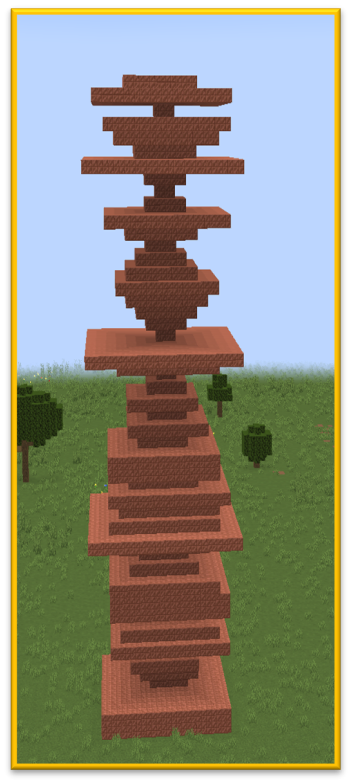
In this project we will build a tower that changes shape in a surprising way.
Instead of each layer having the same size, every layer of the tower will have a different size.
Some layers will be wide, while others will be narrow.
This creates a tower that looks artistic and unpredictable.
The program will use random numbers to choose the size of each layer.
Random numbers are often used in programming when we want results that are different every time the program runs.
Because the program uses randomness, every tower will look slightly different.
How the Program Works
The program builds the tower layer by layer.
A loop repeats the building instructions many times.
During each repetition:
- A random number is chosen.
- A square is created using that number as the size.
- The robot moves upward to create the next layer.
Because the size is chosen randomly each time, the tower grows with an irregular pattern.
Understanding the Code Step by Step
Step 1 — Importing the Random Module
The program begins with the following line:
import randomThis line loads Python’s random module.
A module is a collection of tools that add extra features to Python.
The random module contains functions that generate random numbers.
These numbers allow programs to behave differently each time they run.
Step 2 — Creating the Function
Next we define a function.
def random():This function contains the instructions that build the tower.
When the function runs, the robot builder follows all the instructions inside it.
Step 3 — Creating the Loop
The tower is built using a loop.
for count in range(20):This loop repeats twenty times.
Each repetition creates one layer of the tower.
Step 4 — Generating a Random Size
Inside the loop the program generates a random number.
random.randint(2, 8)The function randint() means random integer.
It selects a random whole number between two values.
In this case the number will be between:
- 2
- 8
This random number becomes the size of the square layer.
Because the number changes every time, the tower layers will have different widths.
Step 5 — Creating the Tower Layer
The robot creates the square using the random number.
vm.createSquare(random.randint(2, 8), True, Block.COPPER_BLOCK)The parameters mean:
- random.randint(2, 8) — the random size of the square
- True — the square is filled
- Block.COPPER_BLOCK — the building material
Copper blocks give the tower a decorative metallic appearance.
Step 6 — Moving Upward
After creating the layer, the robot moves upward.
vm.moveTo(1, Direction.UP)This positions the robot to build the next layer above the previous one.
Python Code
import random
def random():
  for count in range(20):
    vm.createSquare(random.randint(2, 8), True, Block.COPPER_BLOCK)
    vm.moveTo(1, Direction.UP)
Understanding the Python Syntax
Modules
The line import random adds new tools to the program.
Modules allow Python to perform many useful tasks.
Random Numbers
Random numbers make programs behave differently each time they run.
They are often used in games, simulations, and creative programs.
randint()
The function randint() selects a random whole number between two values.
This value can then be used as part of a command.
Try It Yourself
Experiment with the artistic tower program.
- Create taller towers.
- Change the random size range.
- Use different block types.
- Create several towers next to each other.
Because the tower uses random numbers, every tower you generate will look different.
Randomness is a powerful tool that allows programs to create surprising and creative structures.
Lucky Blocks Project
What We Will Build
In this project we will create a simple system inspired by the popular Minecraft idea of Lucky Blocks.
A Lucky Block is something that produces a random result when activated.
Sometimes the result is very good. Sometimes it may be dangerous.
In this program the player will receive a random reward… or possibly something unexpected!
The program combines two important programming ideas:
- Random numbers to generate unpredictable results
- Logic and conditionals to decide what happens
Every time the program runs, the outcome may be different.
How the Program Works
The program works in three main steps.
- A random number is generated.
- The program checks the number using conditional statements.
- Depending on the value, a reward or event occurs.
Because the number is random, the result is different each time the program runs.
Understanding the Code Step by Step
Step 1 — Importing the Random Module
The program begins by importing Python’s random module.
import randomThe random module contains tools that generate random numbers.
These numbers allow programs to behave differently every time they run.
Step 2 — Creating the Function
Next we define the function that will run the Lucky Block system.
def fn():This function contains the instructions that generate the random reward.
Step 3 — Generating a Random Number
The program generates a random number between 1 and 6.
i = random.randint(1, 6)The function randint() means “random integer”.
It selects a whole number between the two values.
In this case the possible numbers are:
- 1
- 2
- 3
- 4
- 5
- 6
The number is stored in the variable i.
The rest of the program will check this value to decide what happens next.
Step 4 — Checking the Result with Logic
Now the program uses conditional statements to check the value of i.
The first condition checks if the value is 1.
if i == 1:The symbol == means “is equal to”.
If the number is 1, the player receives a special item.
vm.giveToPlayer(Equip.INVENTORY, Item.ENCHANTED_GOLDEN_APPLE)An enchanted golden apple is one of the rarest and most powerful items in Minecraft.
Step 5 — Checking Other Conditions
The program continues checking other possible values.
elif i == 2:The keyword elif means “else if”.
This allows the program to check another condition if the first one was not true.
If the value is 2, the player receives a powerful weapon.
vm.giveToPlayer(Equip.RIGHT_HAND, Item.NETHERITE_SWORD)The Netherite Sword is one of the strongest weapons in the game.
Next the program checks another condition.
elif i == 3:If the number is 3, the player receives Elytra wings.
vm.giveToPlayer(Equip.INVENTORY, Item.ELYTRA)Elytra allows players to glide through the air.
Step 6 — The Else Case
Finally the program defines what happens if none of the previous conditions were true.
else:This means the random number was 4, 5, or 6.
Instead of receiving a reward, the player gets a surprise.
vm.createBlock(Entity.ZOMBIE)A zombie appears!
This adds an element of risk to the Lucky Block system.
Python Code
import random
def fn():
  i = random.randint(1, 6)
  if i == 1:
    vm.giveToPlayer(Equip.INVENTORY, Item.ENCHANTED_GOLDEN_APPLE)
  elif i == 2:
    vm.giveToPlayer(Equip.RIGHT_HAND, Item.NETHERITE_SWORD)
  elif i == 3:
    vm.giveToPlayer(Equip.INVENTORY, Item.ELYTRA)
  else:
    vm.createBlock(Entity.ZOMBIE)
Understanding the Python Syntax
Random Numbers
The function random.randint() generates unpredictable numbers.
These numbers make the program behave differently each time it runs.
Conditional Statements
Conditional statements allow the program to choose different actions depending on the value of a variable.
if / elif / else
These keywords create decision branches inside the program.
The program checks each condition until it finds one that is true.
Try It Yourself
Experiment with the Lucky Block program.
- Add more possible rewards.
- Add different monsters.
- Change the probability of rewards.
- Create a Lucky Block arena.
Combining randomness with logic allows programs to create exciting and unpredictable gameplay experiences.