
Lists
In many programs we need to work with several values at the same time.
For example, when building structures in Minecraft we may want to use several different materials:
- Copper blocks
- Diamond blocks
- Iron blocks
Instead of creating a separate variable for every material, Python allows us to store many values together in a structure called a list.
Lists are one of the most useful tools in Python because they allow programs to store and organize collections of data.
Concepts You Will Learn
- What lists are
- How lists store multiple values
- How list indexing works
- How programs select elements from a list
- How lists can control building materials
What Is a List?
A list is a container that stores multiple values inside a single variable.
Lists are written using square brackets [].
Each value in the list is separated by a comma.
For example:
materials = [Block.COPPER_BLOCK, Block.DIAMOND_BLOCK, Block.IRON_BLOCK]
This list contains three block types.
Lists can store many different kinds of data including numbers, text, blocks, and even other lists.
Fun Tower Project
What We Will Build
In this project we will build a tower made of different materials.
Each layer of the tower will be built using a randomly selected block from a list of materials.
Because the material is chosen randomly, the tower will look different each time the program runs.
How the Program Works
The program begins by creating a list that contains several block materials.
Then the robot builder constructs a tower layer by layer.
For each layer:
- A random number is generated.
- The number selects a position inside the list.
- The block at that position is used to build the square layer.
Because the index changes every time, the tower uses different materials on different layers.
Understanding the Code Step by Step
Step 1 — Creating the Function
The program begins by defining a function.
def funtower():This function contains the instructions that will build the tower.
When we run the command:
/vm funtowerthe robot builder executes the instructions inside this function.
Step 2 — Creating the List of Materials
Next the program creates a list that stores several block materials.
materials = [[dict(TYPE=Block.COPPER_BLOCK)], [dict(TYPE=Block.DIAMOND_BLOCK)], [dict(TYPE=Block.IRON_BLOCK)]]
This list contains three elements.
Each element contains information about a block type.
The three materials are:
- Copper block
- Diamond block
- Iron block
Step 3 — Creating the Loop
Next the program creates a loop.
for count in range(10):This loop repeats ten times.
Each repetition builds one layer of the tower.
Step 4 — Generating a Random Index
Inside the loop the program generates a random number.
index = random.randint(1, len(materials))The function len(materials) returns the number of elements in the list.
In this example the list contains three materials.
So the possible random values are:
- 1
- 2
- 3
Each number represents a possible position in the list.
Understanding List Indexing
Lists in Python use something called indexing to access their elements.
Each value inside the list has a position number called its index.
However, Python lists start counting at 0, not at 1.
This means the positions in our list are:
- Index 0 → Copper block
- Index 1 → Diamond block
- Index 2 → Iron block
This can be visualized like this:
materials = [Copper, Diamond, Iron]
             0       1       2
Because Python indexing starts at 0, the program must adjust the random number before using it.
Step 5 — Converting the Random Number to an Index
The program subtracts one from the random number before using it.
materials[int(index - 1)]For example:
- If the random number is 1 → index becomes 0
- If the random number is 2 → index becomes 1
- If the random number is 3 → index becomes 2
This adjustment allows the program to correctly access the list positions.
Step 6 — Building the Tower Layer
The robot now creates a square layer using the selected material.
vm.createSquare(4, False, materials[int(index - 1)])The parameters mean:
- 4 — the size of the square
- False — the square is hollow
- materials[…] — the material selected from the list
Because the material is chosen randomly, every layer of the tower may be different.
Step 7 — Moving Upward
After creating the square layer, the robot moves upward.
vm.moveTo(1, Direction.UP)This positions the robot to build the next layer above the previous one.
Python Code
def funtower():
  materials = [[dict(TYPE=Block.COPPER_BLOCK)], [dict(TYPE=Block.DIAMOND_BLOCK)], [dict(TYPE=Block.IRON_BLOCK)]]
  for count in range(10):
    index = random.randint(1, len(materials))
    vm.createSquare(4, False, materials[int(index - 1)])
    vm.moveTo(1, Direction.UP)
Understanding the Python Syntax
Lists
Lists store multiple values inside one variable.
List Indexing
Indexing allows programs to access individual elements inside a list.
The first element always has index 0.
len()
The function len() returns the number of elements inside a list.
Random Numbers
The function random.randint() allows the program to select different elements each time it runs.
Try It Yourself
Try modifying the tower program.
- Add more materials to the list.
- Create taller towers.
- Use different block types.
- Create decorative random patterns.
Lists are extremely powerful because they allow programs to manage many values at once.
They are widely used in games, simulations, and large programs.
Flag Project — Using Lists for Pixel Art
What We Will Build
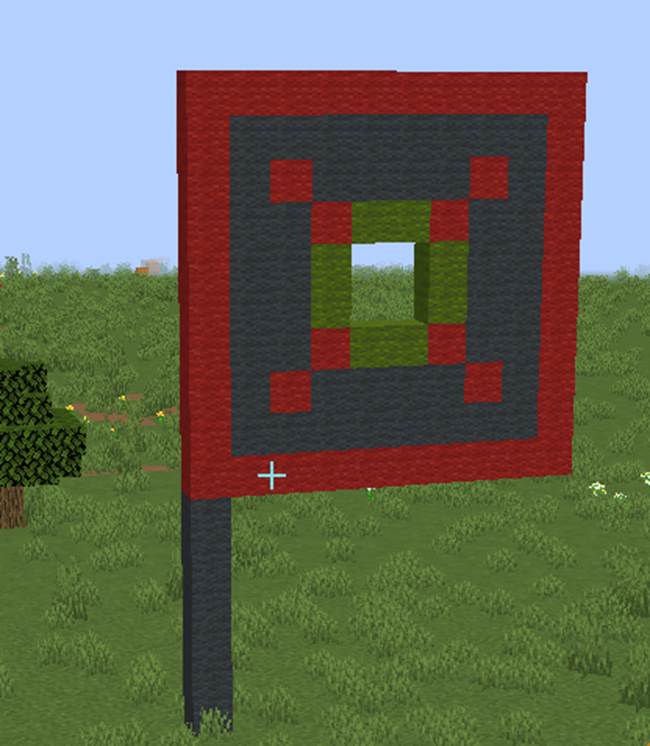
In this project we will build a decorative flag using Python lists.
Unlike the previous tower project, this program uses two different lists:
- A list that describes the drawing pattern
- A list that describes the materials used in the drawing
Together these lists allow the robot builder to create a pixel-art design automatically.
This is a powerful technique that allows programmers to store drawings directly inside a program.
How the Program Works
The program builds the structure in two stages.
- Create the flagpole.
- Draw the flag using a pixel-art pattern.
The flag drawing is created using lists that describe both the shape and the materials of the design.
Understanding the Code Step by Step
Step 1 — Creating the Function
The program begins by defining a function.
def flag():This function contains the instructions needed to build the flag.
When we run the command:
/vm flagthe robot builder executes the instructions inside the function.
Step 2 — Building the Flagpole
The program first builds a vertical pole using a loop.
for count in range(6):
  vm.createBlock(Block.GRAY_WOOL)
  vm.moveTo(1, Direction.UP)
Each repetition places one block and then moves the robot upward.
After six repetitions, the program creates a tall pole for the flag.
Step 3 — Changing the Drawing Direction
Next the program changes the direction of drawing.
vm.setInclination(90)This rotates the robot so that the drawing will appear horizontally instead of vertically.
This is useful when drawing flat images such as flags or signs.
The Pixel Art Pattern List
The first list in the vm.createDrawing command defines the pixel-art pattern.
["1111111111",
 "1000000001",
 "1010000101",
 "1001221001",
 "1002332001",
 "1002332001",
 "1001221001",
 "1010000101",
 "1000000001",
 "1111111111"]
Each string represents one row of the drawing.
Each number inside the string represents a type of block.
For example:
- 1 represents the border
- 2 represents another color
- 3 represents a different color
- 0 represents empty space
This list forms a grid that describes the entire drawing.
The robot builder reads this grid and builds the image one row at a time.
The Materials List
The second list defines which materials correspond to each number used in the drawing.
[
  [dict(TYPE=Block.GRAY_WOOL)],
  [dict(TYPE=Block.RED_WOOL)],
  [dict(TYPE=Block.GREEN_WOOL)],
  [dict(TYPE=Block.AIR)],
  [Block.NOTHING],
  [Block.NOTHING],
  [Block.NOTHING],
  [Block.NOTHING],
  [Block.NOTHING],
  [Block.NOTHING]
]
Each position in this list corresponds to a number in the pattern list.
For example:
- Position 0 → Gray wool
- Position 1 → Red wool
- Position 2 → Green wool
- Position 3 → Air
This system allows the program to translate the pattern numbers into block types.
The robot builder reads the number in the drawing pattern and then looks up the matching material in the materials list.
Why This Technique Is Powerful
Using two lists together allows programs to draw complex designs easily.
The pattern list describes the shape.
The materials list describes the colors or block types.
This technique is commonly used when creating:
- Pixel art
- Flags
- Logos
- Signs
- Decorative patterns
Python Code
def flag():
  for count in range(6):
    vm.createBlock(Block.GRAY_WOOL)
    vm.moveTo(1, Direction.UP)
  vm.setInclination(90)
  vm.createDrawing(
  ["1111111111",
   "1000000001",
   "1010000101",
   "1001221001",
   "1002332001",
   "1002332001",
   "1001221001",
   "1010000101",
   "1000000001",
   "1111111111"
  ], [
    [dict(TYPE=Block.GRAY_WOOL)],
    [dict(TYPE=Block.RED_WOOL)],
    [dict(TYPE=Block.GREEN_WOOL)],
    [dict(TYPE=Block.AIR)],
    [Block.NOTHING],
    [Block.NOTHING],
    [Block.NOTHING],
    [Block.NOTHING],
    [Block.NOTHING],
    [Block.NOTHING]
  ], 1, Draw.CENTER)
Understanding the Python Syntax
Lists
Lists allow programs to store collections of values such as rows of a drawing or groups of materials.
Nested Lists
A list can contain other lists inside it.
This is called a nested list.
Nested lists are very useful for representing grids or images.
Pixel Art Using Lists
By combining a pattern list with a materials list, programs can generate complex drawings automatically.
Try It Yourself
Try modifying the flag program.
- Change the pattern to create a different flag.
- Use different block colors.
- Create pixel art designs.
- Design your own Minecraft logo.
Using lists to store patterns is a powerful technique that allows programs to create complex images using simple data structures.