
Quick Start
In this section you will write your first Python programs and use them to build structures in Minecraft.
Before we start building, it is helpful to understand a little about the programming language we are using.
The language used in this course is called Python.
Python is one of the most popular programming languages in the world. It is used to build websites, control robots, analyze data, create games, and develop artificial intelligence.
One reason Python is so popular is that it is easy to read and easy to learn.
Python programs often look almost like normal sentences, which makes them easier to understand than many other programming languages.
In this course we will use Python to control a robot builder inside Minecraft.
Instead of placing blocks manually, we will write programs that tell the robot what to build.
The robot will then follow the instructions and construct the structure automatically.
Concepts You Will Learn
- What Python is
- How Python programs control Minecraft
- How functions organize instructions
- Basic Python syntax rules
- Your first Minecraft building programs
What Is Python?
Python is a programming language.
A programming language is a way to give instructions to a computer.
Just like people use languages such as English or Spanish to communicate, programmers use programming languages to communicate with computers.
A Python program is simply a list of instructions.
The computer reads those instructions and performs them in order.
For example, a Python program might tell a robot builder to:
- Create a square
- Move forward
- Create a circle
When the program runs, the robot performs these actions step by step.
How Python Connects to Minecraft
In this course we use a tool called VisualModder.
VisualModder connects Python programs to Minecraft.
When you write Python code, VisualModder reads the instructions and sends them to the robot builder inside the game.
The robot builder then performs the instructions exactly as they appear in the program.
This means that a short program can create large structures very quickly.
Basic Python Syntax
Every programming language has rules about how code must be written. These rules are called syntax.
If the syntax is incorrect, the program will not run.
Python has several important syntax rules that you must follow.
In the next part of this section we will learn about some of the most important Python syntax rules, including indentation and parentheses.
Understanding Python Syntax
When writing Python programs, it is important to follow the rules of the language. These rules are called syntax.
Syntax determines how instructions must be written so that the computer can understand them.
If the syntax is incorrect, the program will produce an error and will not run.
Fortunately, Python has very simple and readable syntax rules.
Let’s look at some of the most important rules you will use in this course.
Indentation (Tabbing)
One of the most important rules in Python is indentation.
Indentation means adding spaces at the beginning of a line.
These spaces tell Python that certain instructions belong together.
For example:
def square():
  vm.createSquare(10, False, Block.STONE)
Notice that the second line begins with spaces.
Those spaces tell Python that the instruction belongs inside the function.
Without indentation, Python would not know which instructions belong together.
This is different from many other programming languages that use brackets or symbols to group instructions.
Python uses indentation instead, which keeps programs easier to read.
Parentheses
Parentheses are the round brackets ().
They are used when calling functions or providing information to a command.
For example:
vm.createSquare(10, False, Block.STONE)The parentheses contain the information needed by the command.
Inside the parentheses we place values that describe how the command should behave.
These values are called parameters.
In this example the parameters describe:
- The size of the square
- Whether the square is filled or hollow
- The type of block used
The Colon
Another important symbol in Python is the colon :.
A colon appears at the end of certain lines, such as when defining functions or loops.
For example:
def square():The colon tells Python that the instructions belonging to the function will appear below.
All the instructions that follow must be indented.
Comments
Comments are notes that programmers add to explain the code.
Comments are ignored by Python and are only meant to help humans understand the program.
Comments begin with the symbol #.
For example:
# This program creates a square
def square():
  vm.createSquare(10, False, Block.STONE)
Comments are very useful when programs become longer and more complex.
Functions
A function is a group of instructions that performs a task.
Functions help organize code and make programs easier to understand.
For example:
def square():
  vm.createSquare(10, False, Block.STONE)
This function creates a square.
Once a function is written, we can run it from inside Minecraft.
For example:
/vm squareThis command tells Minecraft to run the square function.
Now that you understand some basic Python syntax rules, we can begin building our first Minecraft structures using code.
In the next project you will create your very first square using Python.
First Square Project
What We Will Build
In this project you will create your first Minecraft structure using Python code.
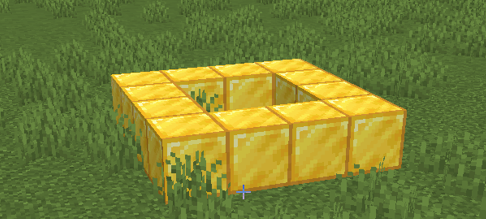
The structure will be a simple square made of blocks.
Although the structure is simple, it demonstrates an important idea:
Programs can control how structures are built in Minecraft.
Instead of placing blocks manually, the robot builder will create the entire shape automatically.
Once you understand how this works, you will be able to create much larger and more complex structures.
How the Program Works
The program contains a function that tells the robot builder to create a square.
When the function runs, the robot places blocks around the edges of the square.
The size of the square and the type of block used are controlled by the command parameters.
Understanding the Code Step by Step
Step 1 — Creating the Function
The first line defines a function.
def square():The keyword def means “define”.
This tells Python that we are creating a new function.
The name of the function is square.
The parentheses are required when defining functions.
The colon at the end tells Python that the instructions for the function will follow on the next lines.
Step 2 — Indentation
The next line is indented.
Indentation means adding spaces at the beginning of the line.
In Python, indentation shows that the instruction belongs inside the function.
Without indentation, Python would not know which instructions belong to the function.
Step 3 — Creating the Square
The robot builder creates the square using the following command.
vm.createSquare(10, False, Block.STONE)This command tells the robot to create a square shape.
The parentheses contain three parameters that control how the square is built.
- 10 — the size of the square
- False — the square is hollow
- Block.STONE — the material used
Because the square is hollow, the robot only builds the outer border.
This creates a frame shape instead of a filled floor.
Python Code
#Python code: Create a square
def square():
  vm.createSquare(10, False, Block.STONE)
Understanding the Python Syntax
Functions
Functions group instructions together so they can be reused.
Once the function is defined, it can be run at any time.
vm.createSquare
This command creates square shapes made from blocks.
Squares are commonly used when building walls, floors, and foundations.
Running the Program
After writing the program, you can run it inside Minecraft.
Use the command:
/vm squareThe robot builder will then create the square automatically.
Try It Yourself
Try modifying the program to see how the structure changes.
- Change the size of the square.
- Use a different block type.
- Create multiple squares next to each other.
Experimenting with the code is the best way to learn programming.
In the next project we will build a tower by repeating shapes vertically.
Tower Project
What We Will Build
In this project we will build a tall tower using Python code.
The tower will be made by stacking several square layers on top of each other.
Instead of writing the same instructions many times, we will use a programming technique that repeats instructions automatically.
This technique is called a loop.
Loops are extremely useful in Minecraft programming because many structures are built by repeating the same shapes.
For example:
- Towers repeat layers vertically.
- Walls repeat blocks horizontally.
- Patterns repeat shapes across the ground.
By using loops, the robot builder can construct very large structures using only a few lines of code.
How the Program Works
The tower program repeats the same building instructions several times.
Each repetition creates one layer of the tower.
After creating a layer, the robot moves upward so that the next layer appears above the previous one.
Repeating this process builds the tower layer by layer.
Understanding the Code Step by Step
Step 1 — Creating the Function
As in the previous project, we begin by defining a function.
def tower():This function will contain the instructions that build the tower.
When we run the command:
/vm towerthe robot builder will execute the instructions inside this function.
Step 2 — Creating the Loop
Next we create a loop that repeats the building instructions.
for count in range(10):This line means that the instructions inside the loop will repeat ten times.
The word count is a variable that keeps track of the current repetition.
The function range(10) tells the loop how many times to repeat.
Because the loop repeats ten times, the tower will have ten layers.
Step 3 — Creating a Tower Layer
Inside the loop the robot creates a square.
vm.createSquare(8, False, Block.STONE)This square forms one level of the tower.
Each time the loop repeats, another layer is created.
Step 4 — Moving Upward
After creating the square, the robot moves upward.
vm.moveTo(1, Direction.UP)This movement positions the robot above the previous layer.
When the loop repeats, the next square appears above the previous one.
This creates a vertical tower structure.
Python Code
#Python code: Create a tower
def tower():
  for count in range(10):
    vm.createSquare(8, False, Block.STONE)
    vm.moveTo(1, Direction.UP)
Understanding the Python Syntax
Loops
Loops allow instructions to repeat automatically.
They are one of the most powerful tools in programming.
range()
The range() function defines how many times the loop will repeat.
vm.moveTo
This command moves the robot builder to a new position.
Movement commands allow structures to grow in different directions.
Try It Yourself
Experiment with the tower program.
- Create a taller tower.
- Change the width of the tower.
- Use different building materials.
- Create several towers next to each other.
Congratulations! You have now written your first Python programs for building structures in Minecraft.
In the next section you will learn more about how to use the visualmodder coding editor