
Complex Shapes
Until now we have built structures using simple shapes such as squares, circles, and lines.
But sometimes we want to create much more detailed structures. These structures may contain many small parts, animals, decorations, and patterns.
To build these complex designs efficiently, the robot builder can use a special command called createDrawing.
This command allows a program to create detailed designs from a grid of symbols. Each symbol represents a block or an entity in the Minecraft world.
Using this technique, we can create complex shapes such as buildings, logos, maps, or even small environments.
Concepts You Will Learn
- How complex shapes can be created from drawing patterns
- How lists can store drawing information
- How symbols can represent blocks or entities
- How loops can repeat complex structures
Zoo Project
What We Will Build
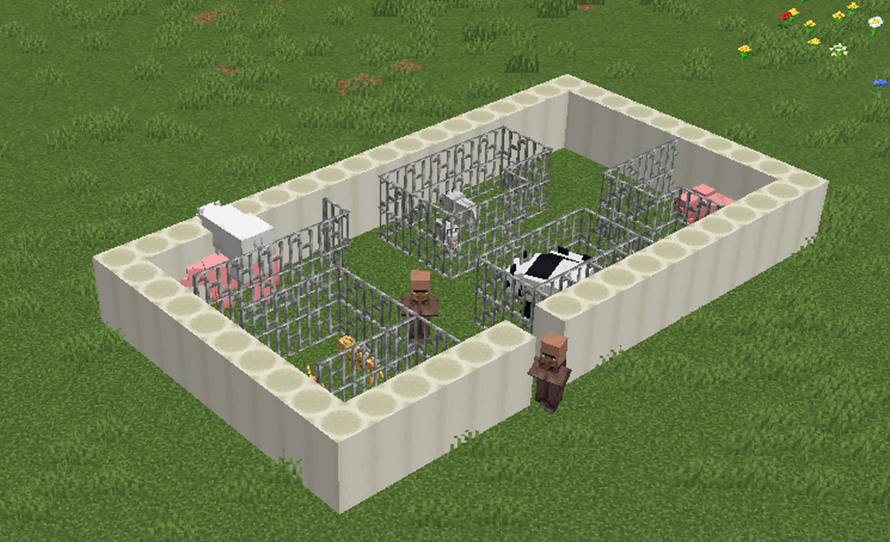
In this project we will build a small Minecraft zoo.
The zoo will contain several animals placed inside a fenced enclosure.
Instead of building every enclosure manually, the program will use a drawing pattern that describes the entire structure.
This pattern includes fences, spaces, and animals.
The robot builder reads the drawing pattern and converts each symbol into the correct block or entity.
The program will then repeat the structure vertically to create multiple levels.
How the Program Works
The program uses a loop to repeat the zoo structure.
Inside the loop the robot builder creates a drawing using a pattern list.
Each number inside the drawing pattern represents a type of block or entity.
A second list defines which materials or animals correspond to those numbers.
By combining these two lists, the program can construct a detailed scene automatically.
Understanding the Code Step by Step
Step 1 — Creating the Function
The program begins by defining a function.
def zoo():This function contains the instructions for building the zoo.
When we run the command:
/vm zoothe robot builder executes the instructions inside the function.
Step 2 — Creating the Loop
The program repeats the zoo structure twice.
for count in range(2):Each repetition creates one zoo structure above the previous one.
Step 3 — Creating the Drawing
Inside the loop the program uses the vm.createDrawing command.
The first list contains the drawing pattern.
Each string represents a row of the drawing.
Each number inside the string represents a different element of the zoo.
The second list defines what each number means.
For example:
- Iron bars create the cage walls
- Bone blocks create floor areas
- Animals such as chickens, pigs, wolves, and pandas appear inside the zoo
- A villager appears as the zoo keeper
The robot builder reads the pattern and places the correct block or entity for each symbol.
Step 4 — Moving the Robot
After creating the drawing, the robot moves upward.
vm.moveTo(1, Direction.UP)This allows the loop to build another zoo structure above the first one.
Python Code
#Python code: Create a rectangle using a drawing
def zoo():
  for count in range(2):
    vm.createDrawing(
    ["222222222222222222",
     "200700101111110002",
     "211111101060010002",
     "200000001001110002",
     "211110001111000002",
     "200510900000011112",
     "200010011111010002",
     "211110010801011042",
     "200310011111001002",
     "222222022222222222"
    ], [
      [dict(TYPE=Block.AIR)],
      [dict(TYPE=Block.IRON_BARS)],
      [dict(TYPE=Block.BONE_BLOCK)],
      [dict(TYPE=Entity.CHICKEN)],
      [dict(TYPE=Entity.PIG)],
      [dict(TYPE=Entity.OCELOT)],
      [dict(TYPE=Entity.WOLF)],
      [dict(TYPE=Entity.POLAR_BEAR)],
      [dict(TYPE=Entity.PANDA)],
[dict(TYPE=Entity.VILLAGER)]
], 1, Draw.CENTER) vm.moveTo(1, Direction.UP)
Understanding the Python Syntax
Lists
Lists are used to store both the drawing pattern and the materials used in the drawing.
Nested Lists
Lists can contain other lists. This allows programs to represent grids or images.
Drawing Patterns
Each number in the pattern corresponds to a specific material or entity defined in the second list.
Loops
The loop allows the program to repeat the entire drawing multiple times.
Try It Yourself
Try modifying the zoo program.
- Add more animals.
- Create larger enclosures.
- Design different zoo layouts.
- Create your own pixel-art environments.
Using drawing patterns allows programs to build very complex scenes using only a small amount of code.
Maze Project
What We Will Build
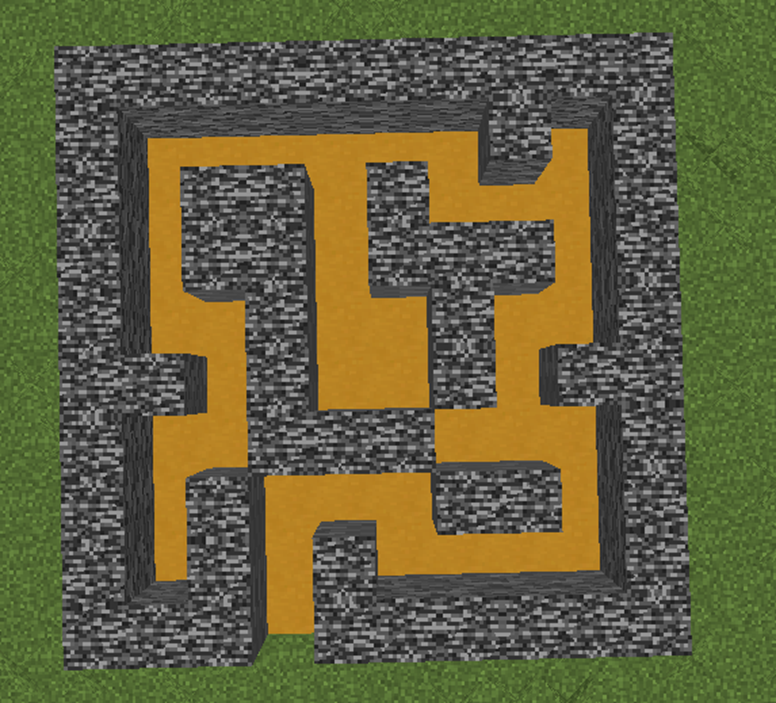
In this project we will build a small maze structure in Minecraft.
A maze is a puzzle where players must find a path from the entrance to the exit by navigating through walls and corridors.
Mazes are common in games because they challenge players to explore and think carefully about which path to follow.
In this program the robot builder will automatically create a maze using a drawing pattern.
The maze will have three levels stacked vertically, and a glass roof on top.
How the Program Works
The program builds the maze in several steps:
- Create the floor of the maze.
- Build three layers of maze walls.
- Add a glass roof.
The maze walls are created using the vm.createDrawing command, which reads a pattern from a list and builds the structure automatically.
Understanding the Code Step by Step
Step 1 — Creating the Function
The program begins by defining a function.
def maze():This function contains all the instructions needed to build the maze.
When we run the command:
/vm mazethe robot builder executes the instructions inside the function.
Step 2 — Creating the Maze Floor
The program first creates the floor of the maze.
vm.createSquare(10, True, Block.YELLOW_TERRACOTTA)The parameters mean:
- 10 — the size of the square
- True — the square is filled
- Block.YELLOW_TERRACOTTA — the material used
This creates a solid floor where the maze will be built.
Next the robot moves upward to begin building the maze walls.
vm.moveTo(1, Direction.UP)Step 3 — Creating the Maze Walls
The program then creates several layers of maze walls using a loop.
for count in range(3):This loop repeats three times.
Each repetition creates one layer of the maze.
Inside the loop the program uses the vm.createDrawing command.
The first list defines the maze pattern.
["1111111111",
 "1000000101",
 "1011010001",
 "1011011101",
 "1001001001",
 "1101001011",
 "1001110001",
 "1010001101",
 "1010100001",
 "1110111111"]
Each string represents one row of the maze.
The numbers inside the pattern represent different elements:
- 1 represents maze walls
- 0 represents empty space where players can walk
The second list defines what each number means.
[
  [dict(TYPE=Block.AIR)],
  [dict(TYPE=Block.BEDROCK)],
  [Block.NOTHING],
  [Block.NOTHING],
  [Block.NOTHING],
  [Block.NOTHING],
  [Block.NOTHING],
  [Block.NOTHING],
  [Block.NOTHING],
  [Block.NOTHING]
]
This means:
- Air blocks create the open paths
- Bedrock blocks create the maze walls
The robot reads the pattern and builds the maze automatically.
After each layer is created, the robot moves upward so the next layer can be built above it.
vm.moveTo(1, Direction.UP)Step 4 — Creating the Roof
After the loop finishes building the maze walls, the program creates the roof.
vm.createSquare(10, True, Block.GLASS)This creates a transparent glass roof so players can see the maze from above.
Python Code
def maze():
  vm.createSquare(10, True, Block.YELLOW_TERRACOTTA)
  vm.moveTo(1, Direction.UP)
  for count in range(3):
    vm.createDrawing(
    ["1111111111",
     "1000000101",
     "1011010001",
     "1011011101",
     "1001001001",
     "1101001011",
     "1001110001",
     "1010001101",
     "1010100001",
     "1110111111"
    ], [
      [dict(TYPE=Block.AIR)],
      [dict(TYPE=Block.BEDROCK)],
      [Block.NOTHING],
      [Block.NOTHING],
      [Block.NOTHING],
      [Block.NOTHING],
      [Block.NOTHING],
      [Block.NOTHING],
      [Block.NOTHING],
      [Block.NOTHING]
    ], 1, Draw.CENTER)
    vm.moveTo(1, Direction.UP)
  vm.createSquare(10, True, Block.GLASS)
Understanding the Python Syntax
Lists
Lists are used to store the maze pattern and the materials used to build the maze.
Nested Lists
The drawing pattern is a nested list where each string represents a row of the maze.
This structure allows the program to represent a 2D grid.
Loops
The loop repeats the drawing process to create multiple layers of maze walls.
Drawing Patterns
The vm.createDrawing command reads the pattern and automatically converts it into blocks in the Minecraft world.
Try It Yourself
Try modifying the maze program.
- Create larger mazes.
- Add more layers.
- Use different materials for the walls.
- Create maze challenges for players.
Using drawing patterns and loops allows programs to create complex puzzle structures automatically.