
Teach coding with
Minecraft Java
Free, no registration needed
VisualModder is the easiest way for children aged 8 – 14 to learn programming inside Minecraft Java Edition. It is 100% free, there is no required registration, there are no mods to install, no server setup, and no software downloads.
Simply join the free VisualModder Community Server using the latest version of the standard Minecraft Java Edition and start coding immediately.
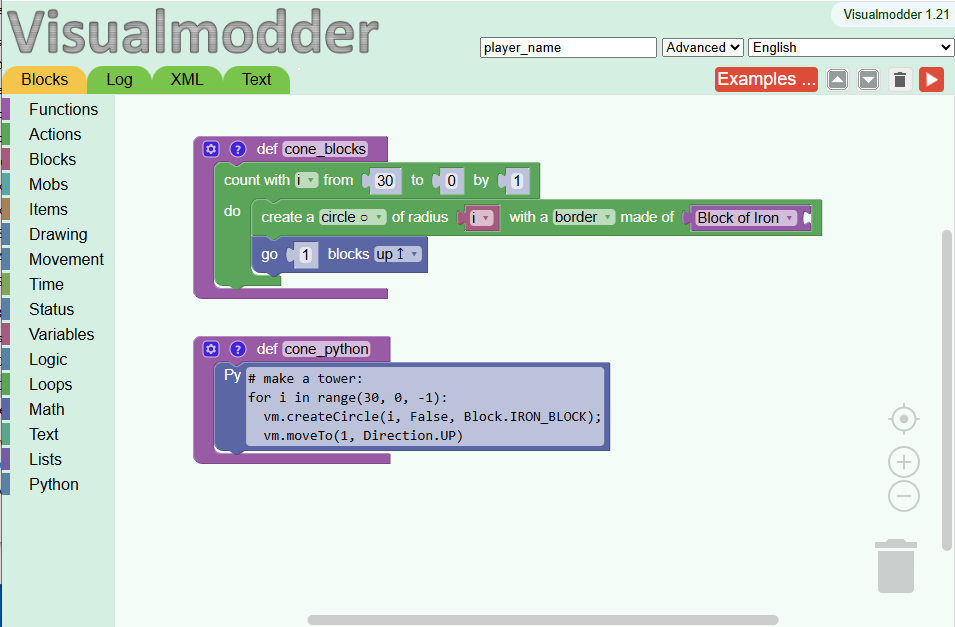
Children can learn with drag-and-drop blocks or Python, write their own programs, and see the results instantly in Minecraft. As their confidence grows, they can move naturally from visual programming to real Python.
More than 3,000 students worldwide have used VisualModder to learn programming in a fun, interactive environment.
Try it now!
- No installation
- No mods
- No registration
- Works with the regular Minecraft Java Edition
- Online code editor included
Click the button below to open the coding editor:
Add this server to Minecraft to join our world and run your programs.
- Minecraft Java Edition (PC/Mac): Connect using the server address
server.visualmodder.org. - Minecraft Bedrock Edition (Tablets/Consoles): Add a server with the IP address below and set the port to
5002.
Check out our Quick Start guide to create your first program and run the code in Minecraft
Why Visualmodder?
For over 10 years, we’ve dedicated our work to building a powerful and accessible Java-based Minecraft plugin — completely free. Our mission is simple: help every child discover STEM (Science, Technology, Engineering, and Mathematics) through creativity, experimentation, and play.
The amazing feedback we get from children in our classes keeps us motivated. It inspires us to keep improving the plugin and make it easier for teachers and individuals to use.
Visualmodder offers a flexible and open alternative to platforms like Minecraft Education Edition — without the typical limitations.
FAQ
- Do I need to install any mods? No.
- Do I need to install software? No.
- Do I use the normal Minecraft Java Edition? Yes.
- Does VisualModder support the latest version of Minecraft Java Edition? Yes. Our community server is continuously updated to support the latest release of Minecraft Java.
- Do I need to host my own server? No, just join the free VisualModder Community Server.
- Is VisualModder browser-based? Yes, the code editor runs online.
- Are there any hidden costs? No. VisualModder is completely free to use. There are no subscriptions, hidden fees, or in-app purchases.
- Do you collect personal data? No. We don’t ask for your personal information or require you to create an account to use the free community server.
- Does the interface include advertisements? No, completely ad-free.
- Can I start coding immediately? Yes. Simply click the Code Editor button at the top of the page to open the online code editor, then join the free VisualModder Community Server using the server address server.visualmodder.org. No installation, registration, or server setup is required.
This means students can start immediately with tools they already have.
Our intuitive drag-and-drop editor makes coding accessible and fun, even for beginners with no prior experience.
Udemy offers two courses using our server
Course 1: Coding for Kids: Learn to program with Minecraft
Discount with Udemy code: CODERS_SPECIAL_2606
Course 2: Coding for kids: Fun with computer algorithms and Minecraft
Discount with Udemy code: ALG_SPECIAL_2606
(Discounts expire on: 17 Jul. 2026)
Open to Everyone
Unlike some platforms, Visualmodder does not require:
- A school license
- A teacher account
- A specific institutional setup
Anyone can use it — students, teachers, parents, or self-learners.
Full Customization with Java Mods & Plugins
Visualmodder runs on the Minecraft Java Edition, giving you access to the full ecosystem of mods and plugins.
- Customize gameplay to match your teaching goals
- Add features and mechanics beyond standard Minecraft
- Create unique and engaging learning environments
Compared to Minecraft Education Edition, this provides significantly more flexibility and creative freedom.
Choose How You Want to Use VisualModder
Option 1: Start Instantly (Recommended)
The fastest and easiest way to learn coding with Minecraft is to use the free VisualModder Community Server.
There is nothing to install, no server to configure, and no registration required. Simply join the server using the standard Minecraft Java Edition, open the online code editor, and start programming immediately.
This is the recommended option for children, parents, teachers, and anyone who wants to start coding in Minecraft within minutes.
Option 2: Add VisualModder to a Hosted Minecraft Server
If you already have a hosted Minecraft Java server, you can install the VisualModder plugin to enable coding on your own server.
Option 3: Run VisualModder on Your Own Server
For advanced users, schools, or organisations, you can install the VisualModder plugin on your own local or private Minecraft Java server.
Server setup is straightforward for anyone with basic technical knowledge, and because VisualModder uses standard Minecraft server technology, you’ll benefit from a large ecosystem of tutorials, documentation, and community resources.
Whether you choose the free community server or host your own, children learn real programming with block coding and Python using the standard Minecraft Java Edition.
Accessible from Anywhere
Your server can be hosted anywhere in the world, allowing students to connect from any location.
- No dependency on school networks
- No complex account systems or restrictions
- Students can use their own accounts
This makes it ideal for both classroom and remote learning environments.
Built-in Multilingual Support
Visualmodder supports 50 languages, including both left-to-right and right-to-left writing systems.
This makes it accessible to a global audience and suitable for diverse classrooms.
👉 See: Visualmodder Supported Spoken Languages
A Smooth Path to Python
Visualmodder is designed to grow with the learner.
- Start with visual block-based coding
- Gradually introduce Python concepts
- Mix blocks and Python in the same editor
This seamless transition helps students move from beginner to more advanced programming without changing platforms.
💡 Why Choose Visualmodder?
Visualmodder combines ease of use, flexibility, and real-world programming concepts — all within the familiar and engaging world of Minecraft.
It removes barriers, encourages creativity, and provides a powerful environment for learning coding in a natural and enjoyable way.
Contact Form
Technical Support
For support and community help, join our Discord: https://discord.gg/A58Sr6WVq4
Disclaimer
THIS IS NOT AN OFFICIAL MINECRAFT PRODUCT AND IS NOT APPROVED BY OR ASSOCIATED WITH MOJANG